

Navigating Apps: How to Make the Most of your Insurance App
- Pediatric Providers Team

- Apr 6
- 4 min read
Insurance apps on your phone can be a great help in managing your child’s healthcare if used correctly. Some ways you can use it include:
Digital ID cards: Sometimes we forget our insurance card and don’t realize it until we are standing at the front desk before our appointment. The Digital ID card removes this as a risk of you not being seen that day.
Finding a Provider: Whether it is a specialist or primary care provider, you can find one that meets your needs. You can filter by location, accepting new patients, or languages spoken.
Claims Management: Any claim, either a recent appointment, emergency room/urgent care visit, imaging, labwork, or hospitalization can be seen on your mobile app. You can see how much your insurance paid and how much you owe. It will give a breakdown.
Estimates: If you are not sure how much a procedure or visit may cost, the mobile app can give you a rough estimate based on your specific plan.
Pharmacy: You can use the mobile app to complete price comparisons for a specific medication or even set up mail-order prescriptions.
Changing PCP: Rather than being on hold for hours with your insurance company, they have made switching your Primary Care Provider seamless through the app.
As we prepare you to transition with us from Dr. Nina Pediatrics, we want to make this process easy for you. One of the main changes we need to make to keep continuity of care for your children at our practice is switching the Primary Care Provider.
Commercial & National Plans
Insurance Plan | Mobile App Name | Portal / Key Feature |
Aetna / Innovation Health | Aetna Health℠ | Change PCP via the "Find Care" or "Member Portal" section. |
BCBS Federal (FEP) | fepblue | Uses the "Find Care" tool; changes can also be made via the MyBlue® portal. |
CareFirst (BlueChoice, Administrators, NCAS) | CareFirst BlueConnect | Log in to My Account; specifically has a "Select/Change PCP" button. |
Cigna / Meritain Health | myCigna® | Available 24/7; select "Find Care & Costs" to update your PCP. |
Humana Military (Tricare East) | Humana Military | Managed via the Beneficiary Web Enrollment (BWE) through milConnect. |
Kaiser Permanente | Direct "Change My Doctor" feature under the "Care Team" tab. | |
Luminare Health (Trustmark) | Luminare Health | Changes typically managed via the Member Portal (formerly Trustmark). |
UnitedHealthcare (Choice Plus, All Savers, GEHA, UMR) | UnitedHealthcare | Digital ID cards update automatically within 2 weeks of a PCP change. |
Maryland Medicaid (HealthChoice) & Community Plans
Insurance Plan | Mobile App Name | PCP Change Method |
Aetna Better Health (MD) | Aetna Health℠ | Use the "Member Portal" or call Member Services at 1-866-827-2710. |
CareFirst Community Plan | CareFirst BlueConnect | Also listed as "CareFirst" in some stores; contains a "Select/Change PCP" tool. |
Maryland Physicians Care | MyVirtualMPC | Primary for virtual care and ID cards; PCP changes often require the member portal. |
MedStar Family Choice | MedStar Health | Change via the Online Benefits Portal or call 888-404-3549. |
UnitedHealthcare Community | UnitedHealthcare | Use the standard UHC app and select the "Community Plan" login. |
Wellpoint (formerly Amerigroup) | Sydney℠ Health | Navigate to the "Care" tab to find/change your doctor. |
Insurances without a Mobile App
Insurance | PCP Change Method |
EHP (Johns Hopkins Employees) | Most changes are handled via the HealthLINK portal or by submitting a specific PCP Change Form to Johns Hopkins Health Plans |
Medical Assistance (Maryland Medicaid Fee-for-Service) | This is managed through the myMDTHINK portal or the Maryland Health Connection app/website. |
How to Change PCP in the App
All the Mobile Apps have a slightly different way of changing Primary Care Provider. Here are the processes in two different mobile apps to assist you in the process.
📱 Cigna App
Use the Cigna mobile app to search for your provider and select them as your Primary Care Provider (PCP) — all without calling.
Step 1 Open the app → tap My Health Team → tap Search Now
 Tap Search Now on My Health Team screen |  The Find Care screen opens.Search by specialty or name. |
Step 2 Type your provider's name in the search bar → select them from the results
 Type the provider name.Select the result (circled). |  On the provider profile,tap 'Select as PCP' (circled). |
✅ Done! Your PCP selection is saved. The change typically takes effect within 24–48 hours. You can confirm from the My Health Team screen.
📱 Wellpoint App
The Wellpoint app has two separate places to work with your PCP. The steps below show the complete process from registration to confirmation.
Step 1 Open the app → register or log in with your Member ID
 Select Member ID to register. | 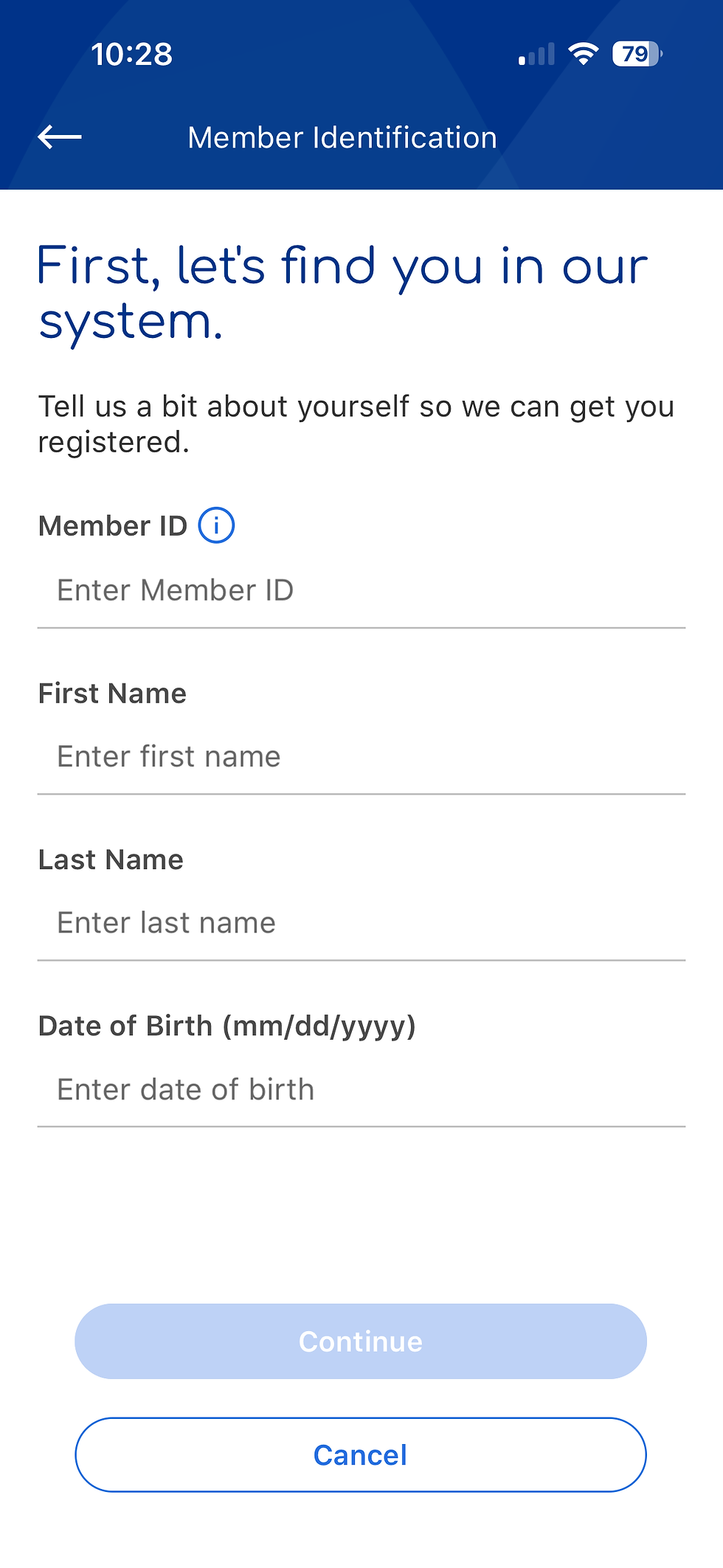 Enter Member ID, name,and date of birth. |
Step 2 Verify your identity with a one-time security code
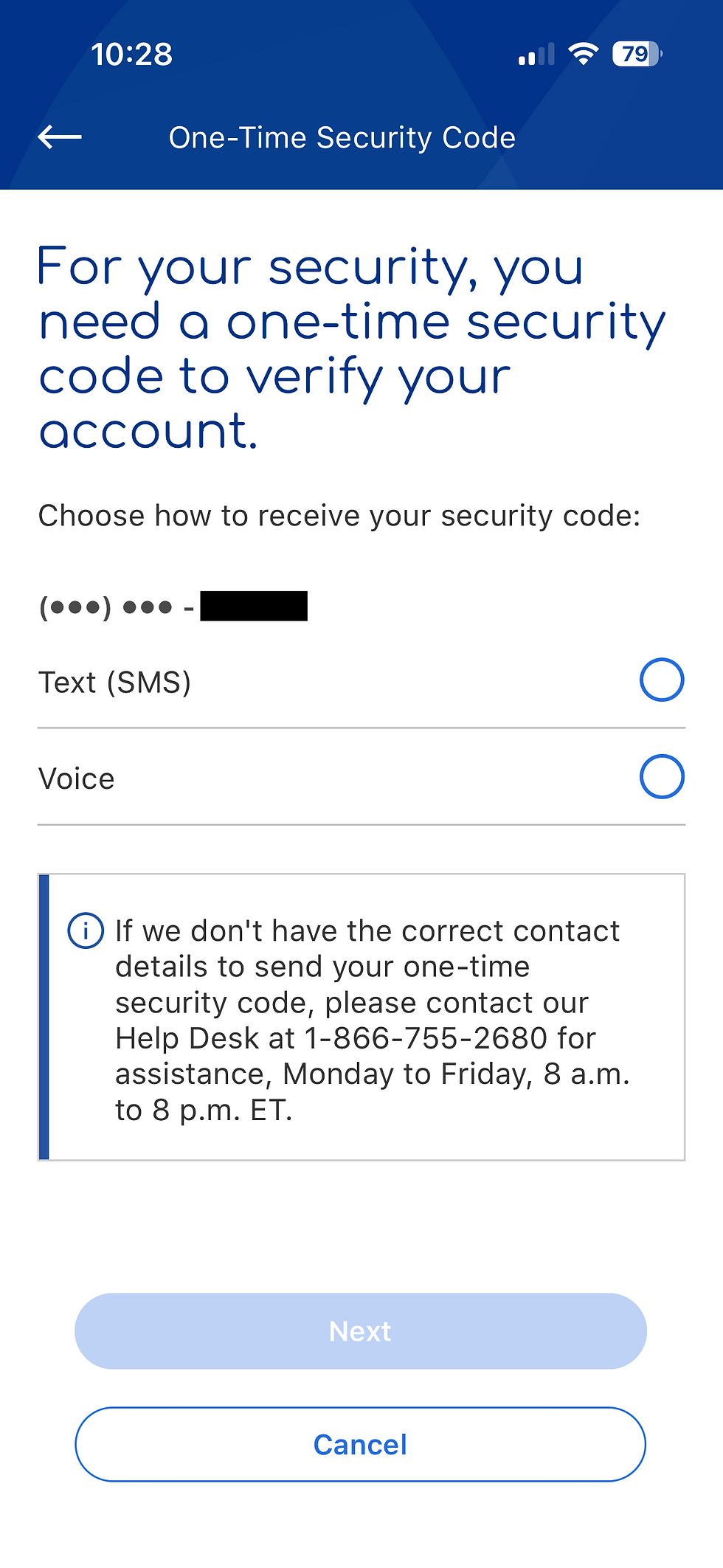 Choose Text (SMS) or Voiceto receive your code. |  Enter the code and tap Continue. |
Step 3 Log in → go to Menu → Access Doctors & Providers → tap My Care Team
 Enter your username and tap Next. | 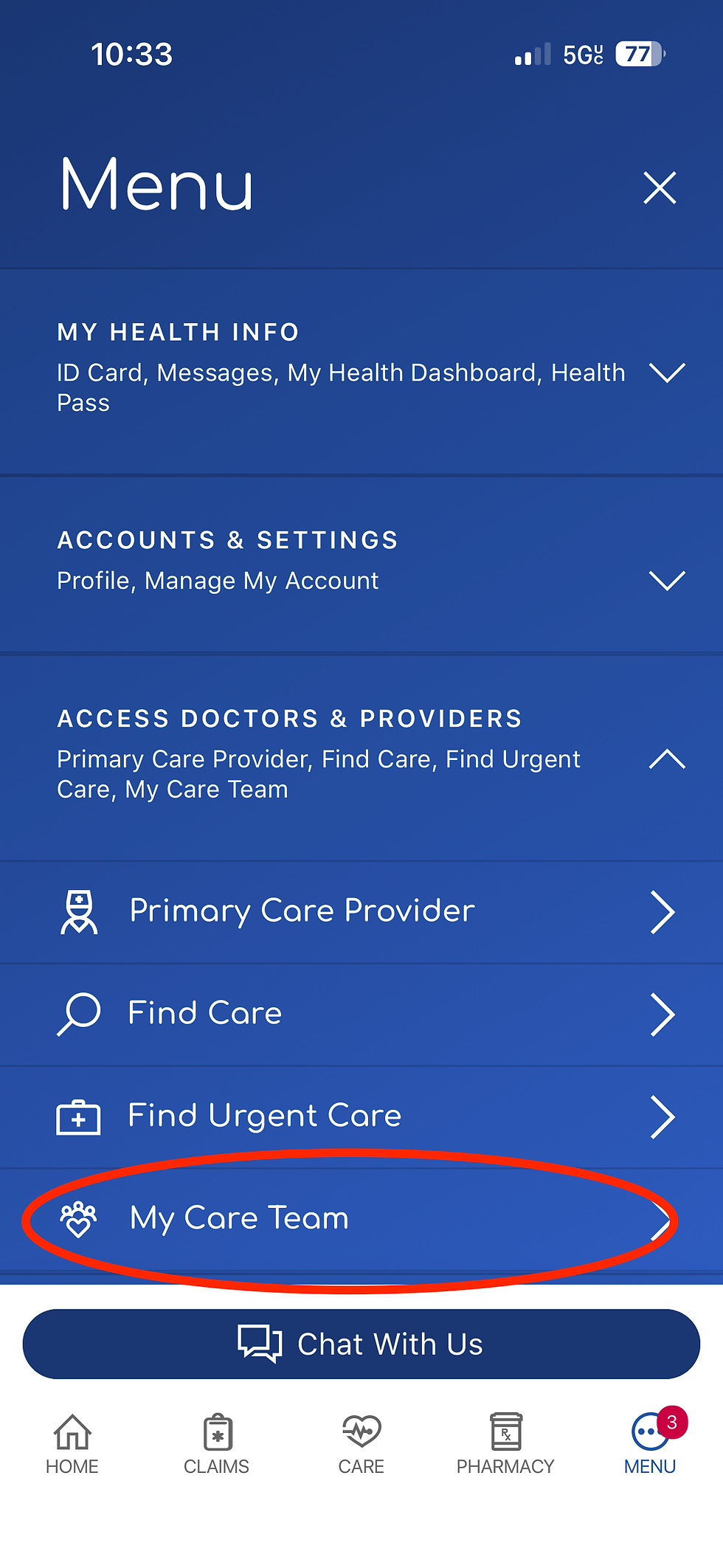 In the Menu, tap 'My Care Team' (circled). |
Step 4 Tap Add or Change PCP → search for your new provider
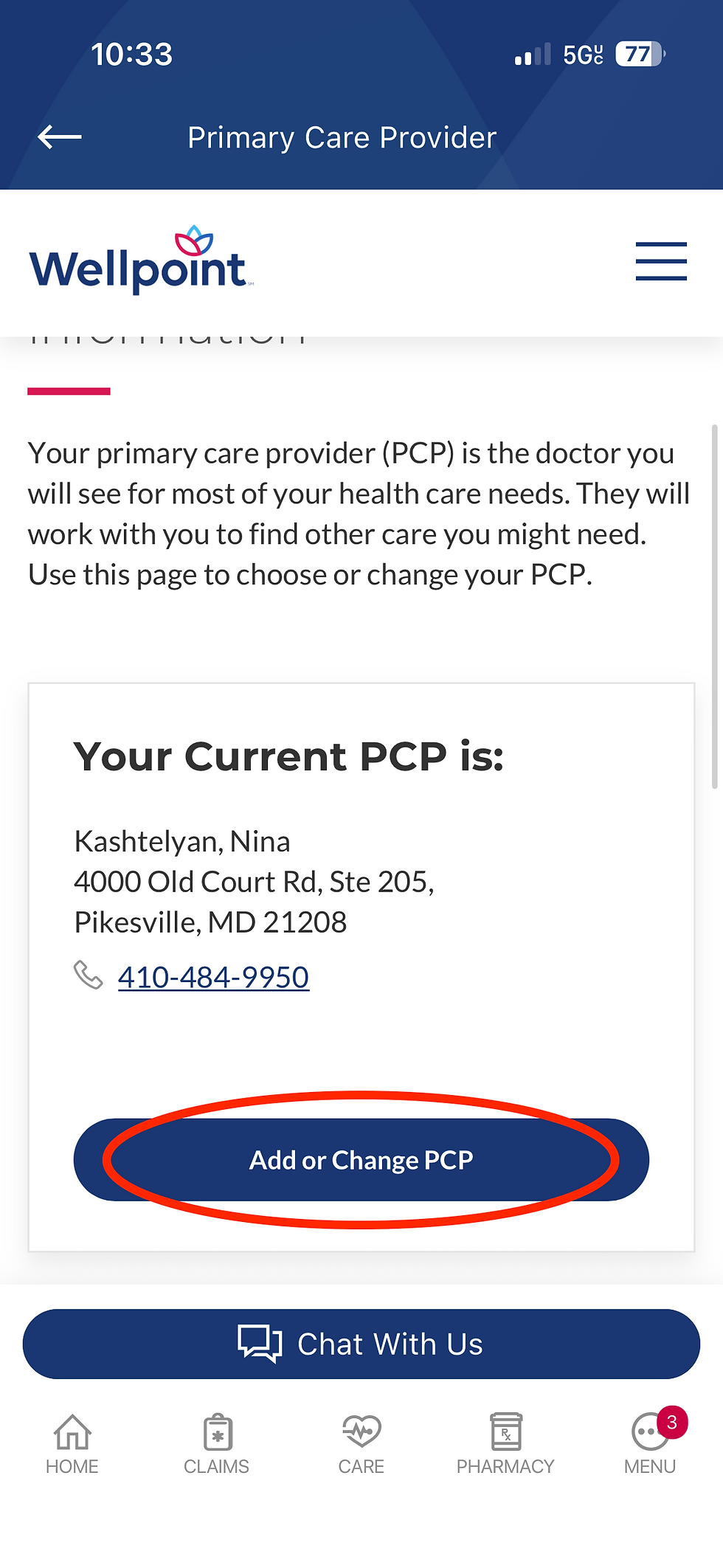 Your current PCP is shown.Tap 'Add or Change PCP' (circled). |  Your new provider appears.Tap 'Assign as PCP' (circled). |
Step 5 Choose a reason from the dropdown → tap Continue to confirm
 Select a reason (e.g., 'Without Cause') and tap Continue (circled). | 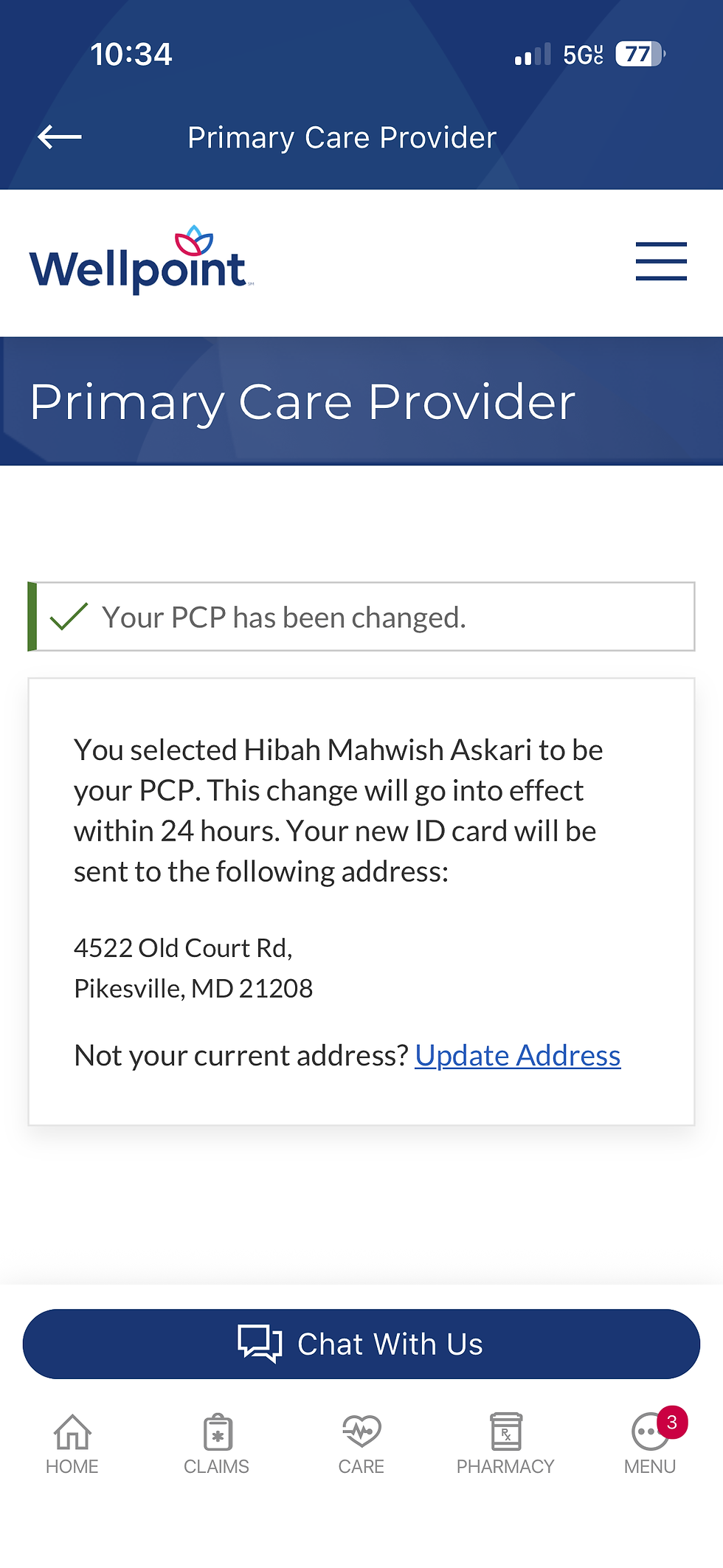 Confirmation screen:'Your PCP has been changed.' |
✅ Done! Your PCP change is confirmed. The change will go into effect within 24 hours and a new ID card will be mailed to your address on file.
Once you have made the change, it will take about 24 to 72 hours for the change to be made. The digital ID card should be available once this is done and your physical insurance card should arrive shortly after.
If there are still any concerns, please feel free to reach out to our office to help you with this process. We are excited to continue caring for your children and families.
Comments